
Virtual Tours for Property Management and Long-Term/Short-Term Rentals
Market the Property. Manage It. Document Its Condition.
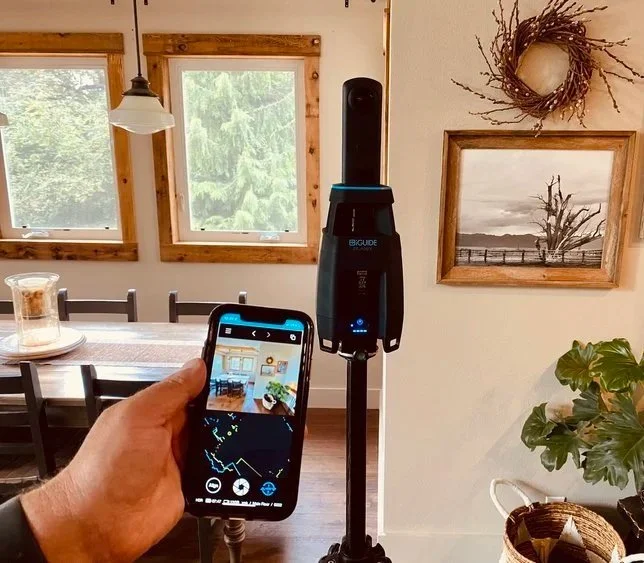
An interactive iGUIDE virtual tour provides value throughout the rental lifecycle. Prospective tenants and guests can explore the property remotely, understand the layout, and discover features that photographs alone may not communicate. Property managers can use the same tour as a remote reference for owners, staff, contractors, and vendors.
For long-term rentals, a dated capture can also provide valuable visual evidence of property condition before occupancy. Capturing the property again after move-out creates a before-and-after record that can help document tenant-caused damage and support the recovery of repair costs.
One capture can help market the property, reduce unnecessary showings, support property management, and protect the owner's investment.
Long-Term Rentals
Reduce Unnecessary Showings
Every showing requires time.
An interactive virtual tour allows prospective tenants to explore the property before scheduling an in-person visit. They can understand the layout, room sizes, storage, parking, outdoor areas, appliances, amenities, and how the different spaces relate to one another.
People for whom the property clearly isn't suitable can eliminate it without consuming staff time. Serious prospects can arrive at a showing already familiar with the property.
For property managers with multiple properties, the tour can remain available and be reused when the property becomes available again.
The virtual tour doesn't replace the showing. It helps make the showing more worthwhile.
Short-Term & Vacation Rentals
Let Guests Understand Exactly What They're Booking
Photography and videography create the initial impression of a vacation rental. An interactive virtual tour allows prospective guests to go further and understand the complete property before they book.
Guests can see how bedrooms relate to common areas, understand sleeping arrangements and bathrooms, explore outdoor spaces, locate amenities, and get a much better sense of the property's size and layout. This can be particularly valuable for larger homes, waterfront properties, vacation homes, distinctive accommodations, and properties where the layout and amenities are an important part of the experience.
The tour can also help answer questions that are difficult to communicate through a collection of individual photographs.
Photography attracts attention. The virtual tour lets guests understand the experience they're booking.
More Than a Virtual Tour
Show Prospective Tenants and Guests What Makes the Property Special
An interactive tour lets prospective tenants and guests explore the property. Strategically placed information tags let you draw their attention to features they might otherwise overlook.
Tags appear directly within the virtual tour at the location where the information is relevant. They can provide additional information and can direct visitors to photographs, videos, documents, websites, and other resources.
For long-term rentals, tags can highlight:
Premium appliances and finishes
Included utilities or services
High-speed Internet, fiber, or Ethernet infrastructure
In-unit laundry
Storage areas
Parking and EV charging
Building amenities
Outdoor living areas
Smart-home features
Energy-efficient upgrades
Security and access features
Views and other property-specific advantages
Hot tubs, pools, saunas, and other amenities
Outdoor kitchens, fire pits, decks, and patios
Beach, lake, or waterfront access
Sleeping arrangements
Specialty appliances and kitchen features
For short-term and vacation rentals, tags can highlight:
Entertainment systems and game rooms
Work-from-home spaces
Accessibility features
Views that may not be apparent when the property is photographed
Distinctive features guests may otherwise overlook
Instead of simply showing prospective tenants and guests the property, tags help explain why they should choose it.
A virtual tour shows the property. Strategic tagging helps communicate its value. Strategic tagging allows for images to be embedded that makes a property special, just as the orcas going by the house in the virtual tour above.

One Tour. Multiple Uses.
A Tool for Ongoing Property Management
The value of the virtual tour doesn't end when a tenant signs a lease or a guest makes a reservation.
Property managers can share the tour with property owners, maintenance personnel, contractors, vendors, and others who need to understand the property remotely.
Instead of relying on a collection of photographs or trying to explain a location over the phone, they can move through the property and understand where rooms, equipment, and building features are located in relation to one another.
This can be particularly useful when an owner or contractor is located elsewhere and cannot conveniently visit the property.
The same tour used to market the property can remain useful throughout its management.
Put Property Information Where People Need It
Use Tags as a Property Management Tool
Interactive tags can continue providing value after the property is occupied. Tags can identify important equipment and property features directly within the virtual environment, helping owners, staff, contractors, and vendors understand what they are looking at and where it is located.
Property-management tags can identify:
HVAC equipment
Electrical panels
Water and gas shutoffs
Water heaters
Appliances
Access points
Protect the Owner's Investment
A Dated Visual Record of Property Condition
An iGUIDE virtual tour creates a detailed visual record of a property associated with a specific capture date.
For property owners and managers, a capture completed before a tenant takes possession provides valuable evidence of the property's visible condition at that point in time.
Instead of relying only on individual photographs, the tour systematically documents the property as a connected space—including walls, floors, doors, cabinetry, countertops, fixtures, appliances, and other visible features.
After the tenant moves out, the property can be captured again.
The dated before-and-after records can then be compared to help establish what changed during the tenancy.
Flooring
Cabinetry
Countertops
Doors and trim
Networking equipment
Fire and safety equipment
Model and serial information
Manuals and documentation
Maintenance information
Other property-specific equipment and systems
Instead of telling a contractor where something is located, the property manager can share the tour and allow them to see the equipment, its location, and the surrounding space before arriving at the property.
Supporting the Recovery of Repair Costs
When Damage Is Disputed, Documentation Matters
When tenant-caused damage occurs, being able to demonstrate that the damage was not present before the tenancy can be important when seeking to recover the cost of repairs.
A dated pre-move-in tour provides visual evidence of the property's previous condition. A post-move-out capture documents the condition in which the property was returned.
Together, these records can provide valuable supporting evidence when damage is disputed, when repair costs are deducted from a security deposit, or when an owner seeks to recover repair costs that exceed the deposit and needs additional documentation.
This can be especially valuable when damage involves expensive:
Fixtures
Appliances
Walls and finishes
Other costly property features
Traditional move-in condition reports and photographs remain important. An iGUIDE tour adds another layer of documentation by systematically capturing the property while preserving the spatial context of what was documented.
Before occupancy: document the condition.
After move-out: document it again.
If damage occurs, have dated visual evidence to help substantiate the cost of repairs.
One Capture. More Than a Virtual Tour.
Measured Floor Plans and Property Documentation
Every iGUIDE project also provides measured spatial information about the property.
Measured floor plans give owners and property managers a clear understanding of the property's layout and dimensions and can remain useful long after the original tour was created.
Depending on the project requirements, available deliverables can include:
Measured floor plans
Room measurements
Floor-area calculations
Detailed floor plans
DWG and DXF floor plans
Dimension plans
Reflected ceiling plans
Exterior elevations
Roof plans
Color-coded floor plans
Optional 3D DWG or Revit (RVT) models
These deliverables can support renovation planning, maintenance, contractor coordination, space planning, and future property documentation.
The same site visit can create a marketing tool, a property-management resource, and measured documentation of the property.

What property managers say about us:
"I work as a property manager, and I've found that sending virtual tours to prospective tenants before showings gives them a clear understanding of the property while saving me valuable time. My experience collaborating with Kosta and Jerry at Ilios Remote Sensing has been outstanding."
Nadya Martynenko, real estate agent/property manager, Re/Max Integrity Issaquah
One Tour. Value Throughout the Rental Lifecycle.
An interactive iGUIDE tour can help market the property, reduce unnecessary showings, communicate important features through interactive tags, provide owners and contractors with remote access, and create dated visual documentation of property condition.
For long-term rentals, capturing the property before occupancy and again after move-out provides comparable visual records that can help document changes in condition and support the recovery of repair costs when tenant-caused damage occurs.